

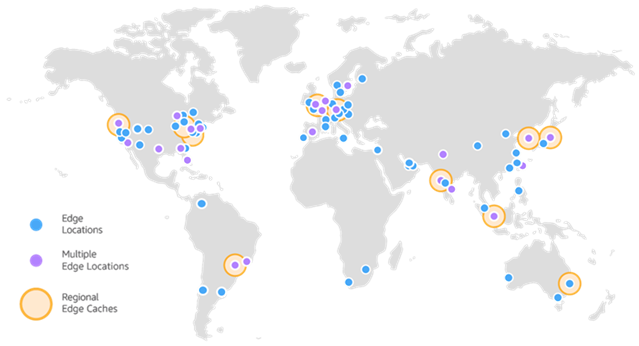
Amazon CloudFront is a web service that accelerates the delivery of static and dynamic web content, such as image, .html, .css, and .js files, to users. CloudFront distributes your content across a worldwide network of data centers called edge locations.

When a user requests content that you distribute through Amazon CloudFront, the request is routed to the edge location that provides the lowest latency (delay) so that the distribution runs at the best possible performance.
- If the content is already in the edge location with the lowest latency, Amazon CloudFront delivers it immediately.
- If the content is not found at such an edge location, Amazon CloudFront retrieves it from a user-defined source, such as an Amazon S3 bucket, MediaPackage channel, or HTTP server (for example, a web server)
CloudFront accelerates content delivery by routing each user request through the AWS backbone network to the edge location that can best serve the content.
This is usually a CloudFront edge server which provides the fastest distribution for the viewer. The benefits are also evident in terms of reliability and availability, as copies of your files (also known as objects) are located (or cached) in multiple edge locations around the world.
Amazon CloudFront: CDN ad alte prestazioni con caching, integrazione S3 e failover avanzato
AWS CloudFront CDN acts as an intermediary between the frontend hosting and the users. With CloudFront, you can cache HTML, CSS, JavaScript, and images. Since the cache is closer to the user, the content will be delivered with minimal latency.
You can also configure CloudFront with origin failover for fallback management in scenarios that require high availability.
The best advantage is that AWS CloudFront natively supports Amazon S3 integration, where you can host your own frontend artifacts. Plus, you can host your front end anywhere and continue serving through AWS CloudFront.
CriticalCase Best Practices and Recommendations
Using cache invalidation for new deployments
It is always useful to invalidate the cache when doing a new deployment to prevent browsers from retrieving old versions of files from the cache. AWS CloudFront now supports fast cache invalidation, allowing you to instantly deploy updates to your SPA while having the benefit of CDN caching.
Note: As a procedure, you can only invalidate files that have changed in the distribution. For example, if you are using Webpack with the default configuration, it is enough to invalidate the index.html as any modified JS and CSS will have new file names.
You can also use AWS Amplify to simplify cache deployments and invalidations with built-in optimizations.
Use private S3 buckets and Origin Access Identity for security
If you are using an Amazon S3 bucket as the source for a CloudFront distribution, it is essential to restrict public access to S3.
Restricting access prevents someone from bypassing CloudFront and accessing content you want to keep safe via the Amazon S3 URL.
You wonder why it matters since it is the frontend assets that are meant to be public? The reason is that publishing via AWS CloudFront gives you more control, in that
For hashed URLs, use Lambda@Edge
Lambda@Edge allows you to intercept HTTP requests that go through CloudFront. These functions are performed in CloudFront Edge Locations closer to the user, making it faster to respond or act on content in transit.
Some common use cases of Lamda@Edge are:
- Dynamically generate customized content based on request or response attributes, such as resizing images based on request attributes.
- To add logic to requests and responses, such as creating eye-catching URLs and managing authentication and authorization for originating requests.
- To increase the cache hit ratio, resulting in improved application performance by avoiding latency caused by a cache failure.
- To manage custom authentication and authorization.
- If you need to learn more about Lamda@Edge, you can consult the documentation provided by AWS.
Note: If you need simple needs like using hashless URLs only, there is a simple follow-up approach. Since the goal is to serve the index.html even a user goes directly to a path, we can set up CloudFront error handling on the index.html server if S3 returns the “resource not found” error with the error code 404.
Using Compression (Brotli, Gzip)
Another best practice I encourage you to follow is using a compression method. With AWS CloudFront, you can serve your applications using Brotli or GZip and dramatically reduce your content download speed.
Faster downloads, especially for JavaScript and CSS files, can result in faster rendering of your SPA.
Also, because CloudFront’s data transfer costs are based on the total amount of data served, managing compressed files is less expensive than managing uncompressed files.
Brotli is a widely used lossless compression algorithm that often outperforms Gzip in terms of compression ratio. Compared to Gzip, CloudFront’s Brotli edge compression results in files up to 24% smaller.
Compression capabilities can be enabled through the CloudFront console, SDK, and command line interface. EnableAcceptEncodingGzip must be set to true to return Gzip compressed objects and EnableAcceptEncodingBrotli to true to return Brotli compressed objects. CloudFront will use Brotli when the viewer supports both formats.
The Chrome and Firefox web browsers support Brotli compression only when the request is sent over HTTPS. Brotli is not supported with HTTP requests in these browsers.
Using versioned file names
When performing a new distribution, you can invalidate files or assign them versioned file names to check the versions of files managed by the distribution. If you frequently update your files, we recommend that you use file versioning.
- Versioning gives you better control over the content provided by CloudFront.
- Versioning makes it easy to analyze the effects of file changes because CloudFront access logs include file names.
- Versioning allows you to offer different versions of files to different users.
- Versioning makes it easy to roll back and forth between file revisions.
- The cost of versioning is lower. You still have to pay CloudFront to transfer new versions of your files to edge locations, but you don’t have to pay to invalidate the files.
slider_v1.js, image_v1.jpg are some versioning names of the sample files that you can use.
Over the years, we have had the opportunity to support our clients with our AWS WAF solutions, applying them across a wide range of contexts, including e-commerce platforms, websites, and various types of web applications.
Integration with AWS WAF and ElasticSearch for complete Application Security management
CriticalCase, as an AWS partner, has developed a strong expertise on implementing AWS WAF in different contexts.
Thanks to years of experience, gained on multiple projects, we have developed a series of best practices aimed at installing, configuring and maintaining AWS WAF in the most correct and appropriate way for the customer context. These activities cover the implementation of and management of:
- Out-of-the-box traffic blocking rules
- Custom and dynamic traffic blocking rules, which are updated via AWS Lambda on a scheduled basis or in response to certain events
- Integration with Edge and Back-End services Integrated
- Monitoring through AWS CloudWatch
- Implementation of a customized dashboard for monitoring logs and WAF traffic, through an integrated solution AWS ElasticSearch + Kibana
Operational Management and Logging
Some organizations, in addition to the design, deployment, and integration of AWS WAF, also entrust us with its governance and operational management. This involves centralized management by a specialized team operating 24/7. The Operational Management team monitors the correct functioning of the WAF and performs tuning on filtering rules and all aspects that ensure its proper operation. The team is also able to promptly recognize and respond to attacks, detected through the AWS CloudWatch monitoring system and the AWS Elasticsearch Kibana dashboard used for analysis and monitoring.
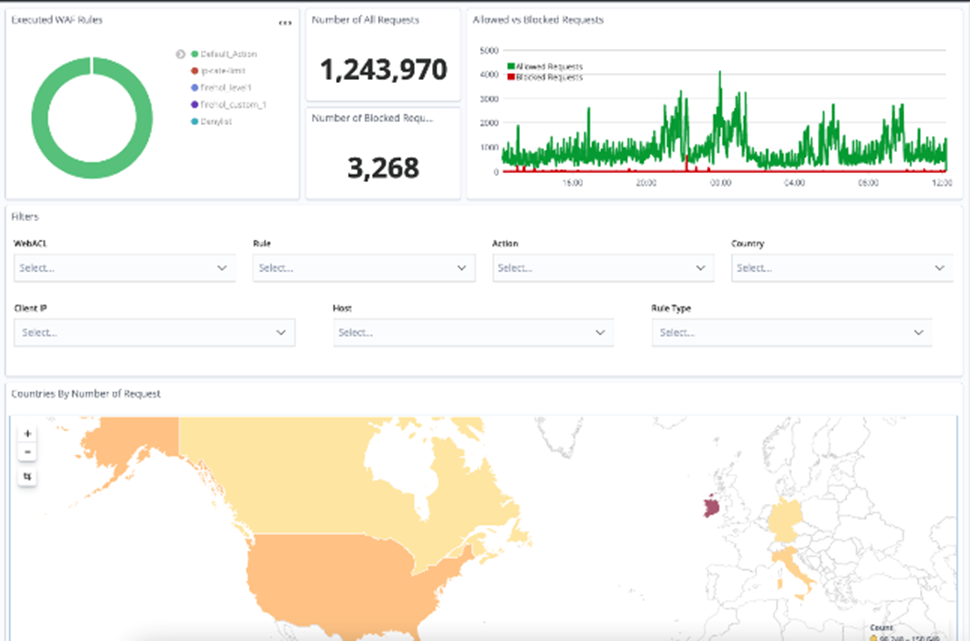
The Elasticsearch Kibana dashboard aggregates the information provided by AWS WAF logs and offers near real-time insights into:
- “Benevolent” traffic
- “Malicious” traffic and therefore blocked
- Active rules and relative percentage of blocked traffic
- Geolocation of “attacks” (malicious traffic blocked)
- IP addresses / classes
- Resources (URLs) targeted by the attack
- Request headers
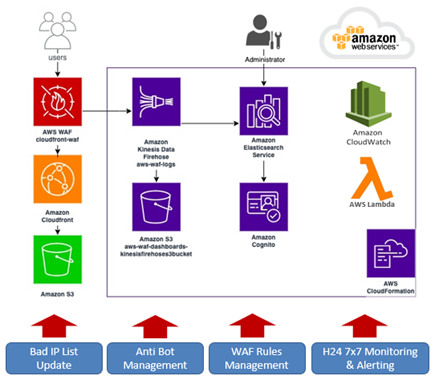
The solution is also equipped with several automated processes, through AWS Lambda, designed to perform tuning and improvements to the WAF rules, as shown in the architectural diagram.
Integration with AWS Firewall Manager
You can centrally configure and manage AWS WAF deployments across multiple AWS accounts using AWS Firewall Manager. When you create new resources, you can ensure that they comply with a set of security rules.
Firewall Manager performs automatic audits and notifies the security team when a policy violation occurs, allowing them to respond and act promptly. For more information on Firewall Manager visit the product website.
AWS CloudFront Costs
As with all AWS services, AWS CloudFront pricing is public and clear: https://aws.amazon.com/it/cloudfront/pricing/.
The advice we always give to our customers is to contact CriticalCase both for the initial “price planning” activities and for the purchase of the service, since as an AWS Partner specialized in this competence, we are able to bring to the Customer:
- A correct cost analysis in the estimate
- The best purchase price, also by accessing a reserved pricing for purchase volumes distributed across multiple customers
- Our Cost & Service Optimization services https://aws.amazon.com/it/cloudfront/pricing/